Typing Tests
What Is a Good Typing Speed? 40, 60, 80, and 100 WPM
Discover what makes a good typing speed across 40, 60, 80, and 100 WPM milestones, how accuracy affects real output, and how to track your median score.
By ProTypingGames ·
About 40–60 words per minute is a useful practice range for everyday English copy. What counts as a good score depends on the task, the test length, and how accurately you type. Use 40, 60, 80, and 100 WPM as milestones you can measure under consistent conditions.
Many people search for a single universal number to target. The truth is that typing speed exists along practical milestones rather than rigid pass-or-fail thresholds. A figure that works well for answering personal emails might feel slow if you take live meeting notes, and an elite speed does not help much if errors force you to stop and edit every sentence. Understanding where you stand across 40, 60, 80, and 100 words per minute (WPM) lets you set realistic targets tailored to your real-world keyboard demands.
How typing speed is measured
To understand what makes a score good, you first need to look at how tests compute words per minute. In standardized typing metrics, a typing “word” is defined as five character units, which includes letters, spaces, and punctuation marks.
Online assessments track two main speed metrics: raw WPM and net WPM. Raw WPM measures how quickly you produce text regardless of errors. It takes the total number of retained character units you entered, divides that number by 5, and then divides by the elapsed time in minutes.
Net WPM measures your clean, usable output. It takes only the correctly matched character units you entered, divides by 5, and divides by the elapsed time in minutes. Because of this formula, net WPM cannot simply be calculated by multiplying your raw WPM by your attempt accuracy percentage.
Attempt accuracy reflects your precision across every keystroke you logged. In ProTypingGames tests, accuracy equals your successful keystroke attempts divided by all scored keystroke attempts multiplied by 100, rounded to the nearest whole number. If you make a mistake and immediately hit backspace to fix it, that original typo still counts as a failed attempt in your accuracy score. Furthermore, backspace works across spaces within the active screen in every test, though you cannot return to completed pages. Because those corrected-and-deleted characters are not retained in your final submission, they do not boost your retained character counts.
Outside of controlled typing tests, research into everyday typing gives useful context, provided you view the data carefully. A large-scale 2018 desktop keystroke study of online volunteers found an average speed of about 52 WPM within its specific participant pool. That 52 WPM figure comes from self-selected volunteers who chose to take an online test, so it is an observational data point rather than a universal population average or a formal hiring standard.
Breaking down the four key milestones
Instead of worrying about demographic percentiles, it is far more practical to treat 40, 60, 80, and 100 WPM as functional capability milestones. Each tier changes how smoothly your thoughts transfer from your mind onto the screen.
40 WPM: functional everyday typing
At 40 WPM, you type roughly 200 characters per minute. This speed allows you to handle general office tasks, draft emails, search the web, and contribute to chat threads without feeling held back by the keyboard.
People typing around 40 WPM often use hybrid techniques. You might look down at your hands occasionally to locate less familiar keys like numbers or symbols, but you generally know where common letters sit. You may need to pause to find punctuation marks or keyboard shortcuts. While 40 WPM is completely adequate for casual daily computer use, long reports or real-time note-taking can feel tedious.
60 WPM on a repeatable test
At 60 WPM, you produce the equivalent of 300 characters per minute. If you can repeat the score with good accuracy on sentences and longer passages, it gives you a more useful picture of your pace than a single quick score. For a job test, compare it with the specific posted requirement.
Use that pace to test the part of your typing you want to use at work. If capitals and symbols slow you down, keep the word-list score and collect a separate score with punctuation. Those two readings help you pick a drill you can apply to your actual writing.
80 WPM: high-efficiency production
At 80 WPM, you generate roughly 400 characters per minute. At this speed, typing stops being a conscious physical task. The delay between forming a thought and seeing it appear on screen effectively disappears.
This tier benefits software developers, technical writers, editors, paralegals, and customer support specialists who manage multiple concurrent conversations. When you can output text at 80 net WPM with high accuracy, your keyboard ceases to be a bottleneck. The limiting factor in your workday becomes how fast you can think, research, and organize ideas.
100 WPM: advanced speed
Typing at 100 WPM means sustaining roughly 500 clean characters per minute. Achieving this speed across paragraphs of running text requires excellent muscle memory, minimal finger travel, and rapid visual reading ahead.
If you reach 100 WPM once, repeat the same format and then try a longer passage. That shows how often you can produce the score and whether it carries over to a task with pauses, capitals, and punctuation.
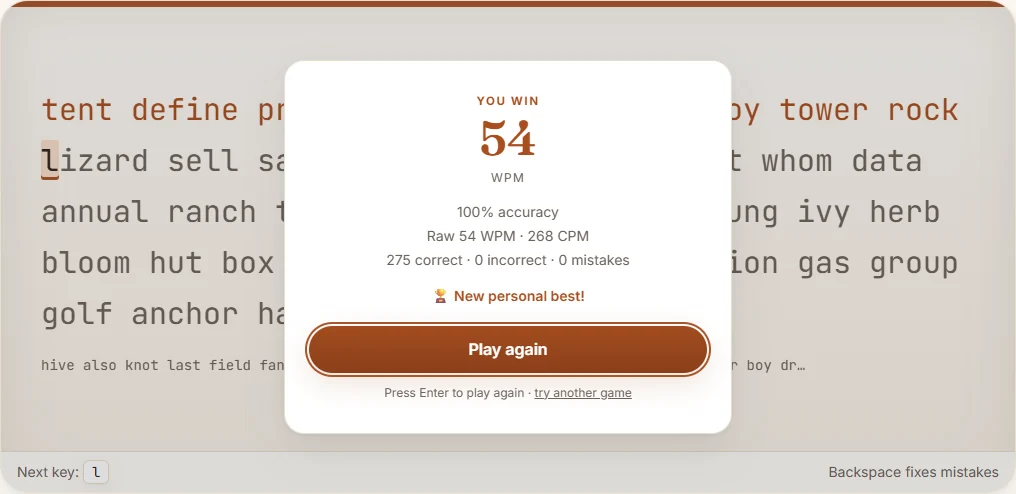
Why raw speed without accuracy is an illusion
High raw speed does not help you if poor accuracy creates broken sentences. Every time you make an error in real work, your flow breaks. You stop typing, evaluate the typo, press backspace several times, re-enter the correct letters, and re-read the sentence to regain your train of thought.
Consider two typists who both complete a one-minute test using standard English text. To see how the math works in practice, you can follow our guide on how to calculate WPM accurately. Let us walk through a labeled example showing how errors pull down usable output.
Worked score comparison: fast and messy versus steady and clean
Imagine Typist A and Typist B both take a 60-second test.
Typist A moves their fingers quickly but makes frequent mistakes, correcting some along the way while leaving others behind:
- Total scored keystroke attempts: 420
- Successful attempts: 378
- Failed attempts: 42
- Attempt accuracy: 378 divided by 420 multiplied by 100 = 90%
- Retained character units submitted at the end of 60 seconds: 350
- Correctly matched character units: 315
- Raw WPM: (350 / 5) / 1 minute = 70.0 raw WPM
- Net WPM: (315 / 5) / 1 minute = 63.0 net WPM
Typist B moves at a measured pace, keeping their hands calm and focusing on striking keys cleanly:
- Total scored keystroke attempts: 340
- Successful attempts: 333
- Failed attempts: 7
- Attempt accuracy: 333 divided by 340 multiplied by 100 = 98%
- Retained character units submitted at the end of 60 seconds: 335
- Correctly matched character units: 330
- Raw WPM: (335 / 5) / 1 minute = 67.0 raw WPM
- Net WPM: (330 / 5) / 1 minute = 66.0 net WPM
Notice the outcome. Even though Typist A registered a higher raw speed of 70 raw WPM compared to Typist B at 67 raw WPM, Typist B finished with higher net usable speed: 66 net WPM versus 63 net WPM. Typist A burned physical energy on 42 missed strokes and deletions that contributed nothing to their final correct character count.
Establishing your baseline with a three-run median
A single typing test rarely tells you your true operating speed. If you happen to encounter words you find easy, your score spikes. If you stumble on a capital letter or an unfamiliar punctuation mark, your score plummets.
To find your true current milestone, establish a comparable three-run median routine using our standard 1-minute typing test. Timed tests on ProTypingGames begin on the first accepted typing input after you launch the test, which uses an ongoing English word stream.
Follow these practical steps:
- Sit in your normal working posture. Make sure your keyboard sits at a comfortable height where your wrists remain straight.
- Complete your first one-minute test. Do not rush. Focus on hitting each key in the center with a light touch.
- Note your net WPM and your accuracy percentage. Rest your fingers for 30 to 60 seconds.
- Take your second one-minute test using the same steady pacing. Record the results.
- Take your third one-minute test, record the results, and arrange the three net WPM numbers from lowest to highest.
- Select the middle number. That value is your baseline median net WPM.
Worked baseline example
Suppose your three consecutive one-minute tests yield the following scores:
- Run 1: 54 net WPM (94% accuracy)
- Run 2: 61 net WPM (97% accuracy)
- Run 3: 58 net WPM (96% accuracy)
Ordering these from lowest to highest gives 54, 58, and 61. Your current median baseline is 58 net WPM. This median eliminates the temporary distortion of an unusually clumsy run or an unusually lucky run.
Structuring practice across different formats
Once you know your baseline median, diversify your practice so you do not merely adapt to one specific format.
Standard word-stream tests help build raw physical cadence. However, sustained work requires navigating capital letters, punctuation marks, and paragraph transitions. For real-world writing endurance, take our paragraph typing test, which presents running prose across a two-minute window using distinct paragraph content rather than a word stream.
You can also use focused games to isolate specific mechanical weaknesses:
- If you struggle with finger independence on individual letters, single-letter prompt games like Balloon Pop or Key Jump train quick recognition without complex word shapes.
- If you find yourself hunting for keys across different rows, Home Row Hero starts along the central home row and systematically expands your reach outward across the board.
- If you want to train consistent typing under time pressure, Word Rain drops words that you must clear cleanly before they reach the bottom of the screen.
- If you prefer relaxed practice where you can focus entirely on hand posture without a clock ticking down, Zen Type provides an untimed environment with no countdown and no lost lives.
Remember that each game and test tracks its own distinct scoring system. A score in Word Rain or Balloon Pop reflects the rules of that specific game, so you should never compare game points directly against a net WPM score from a timed typing test.
Take action on your keyboard today
Do not worry about hitting triple digits if your daily tasks do not require it. Instead, take a moment right now to complete a three-run median assessment, record your net WPM and accuracy, and target the next functional milestone with steady, error-free keystrokes.
Put it into practice
The fastest way to improve is to play. Jump into a free typing game and try it now.
Play free typing games