Typing Tests
Can You Use Backspace During a Typing Test?
Learn how using backspace affects your typing test speed, accuracy, and score calculations, including step-by-step math and correction strategies.
By ProTypingGames ·
Yes, you can use the backspace key during a typing test to edit and correct mistakes on your active screen. However, while backspacing removes retained character errors from your final text, every keystroke attempt, including original miskeys, remains permanently recorded in your overall accuracy score.
When you sit down to take an online assessment, understanding how correction mechanics impact your final score makes the difference between passing and falling short. Many typists assume that pressing backspace completely erases a mistake as if it never happened. On ProTypingGames, backspacing repairs the visible character stream, but the underlying system tracks every single attempt you make. Knowing when to fix an error and when to press forward is one of the most effective ways to raise your score.
How backspace behaves on your screen
During a typing test, backspace functions as an editing tool across the current active view. If you make a typo three words back on your current screen, you can hold down the backspace key to erase through spaces and words to reach the incorrect character. Every character you delete is removed from your retained character count. Once deleted, those characters no longer sit on the screen, meaning they will not count toward your raw output speed.
However, backspace has clear operational boundaries. You cannot use backspace to return to a previously completed screen or page. Once the display advances to a new set of words or lines, past text is finalized. In addition, pressing backspace does not pause or rewind the elapsed test timer. The seconds spent backing up and retyping text continue to tick away, directly reducing the total volume of text you complete during your test window.
The visual interface displays your active prompt, highlighting correct text in real time while signaling uncorrected errors ahead of your cursor.
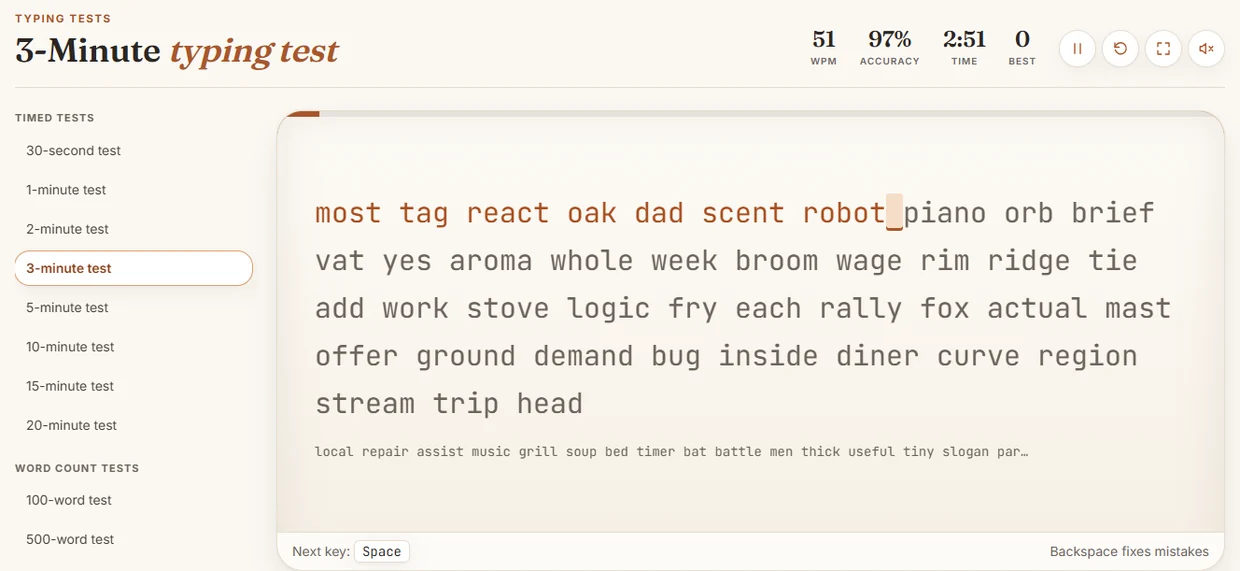
Understanding this visible prompt structure helps you instantly decide whether an error is worth erasing or leaving behind.
The math behind speed and accuracy calculations
To make smart decisions about using backspace, you need to understand how WPM is calculated on the platform. Test results evaluate your typing performance using specific formulas that separate raw production from net precision.
Raw words per minute (WPM) measures your total retained typing volume. The system takes the total number of character units remaining on your screen at the end of the test, divides that number by five (the standard industry unit for a word), and divides by the total time in minutes. If you type an entry, make a mistake, and backspace over five characters, those five deleted characters disappear from your retained count. You spent time typing them, but they yield zero contribution to your raw WPM.
Net WPM measures your actual error-free output speed. The system takes the total number of correctly matched character units remaining on your screen, divides by five, and divides by the total test duration in minutes. If you successfully backspace and fix a mistyped letter before time expires, that character becomes a correctly matched unit, boosting your net WPM.
Accuracy reflects your overall physical precision. It is calculated by dividing your total successful attempts by all scored attempts, then multiplying by 100 to yield a rounded percentage. Crucially, fixing a typo does not erase the initial failed attempt. If you hit the wrong key, hit backspace, and then hit the right key, you have logged one failed attempt and one successful attempt.
A common misconception is that net WPM is simply raw WPM multiplied by your accuracy percentage. That formula is mathematically incorrect. Net WPM depends strictly on correctly matched retained characters over time, whereas accuracy reflects your total keypress error rate across the entire attempt history.
Detailed character-level example
To see these formulas in practice, let us walk through a complete character-level typing attempt. Imagine taking a test with the following target prompt string:
Focus on accuracy first.
This target string contains 24 total implementation units, counting letters, spaces, and the period. Suppose a typist completes this prompt over exactly 12 seconds (which equals 0.20 minutes) using the following physical keystroke sequence:
- Types
Focus oncorrectly (9 characters, 9 successful attempts). - Types
accucorrectly (4 characters, 4 successful attempts). - Types
rcorrectly (1 character, 1 successful attempt). - Attempts to type
abut accidentally hitss(1 unsuccessful attempt). The active screen temporarily displaysFocus on accurs. - Hits
Backspaceto delete the incorrects. - Types
acorrectly (1 successful attempt). - Types
cycorrectly (2 characters, 2 successful attempts). - Types
- Types
first.correctly (6 characters, 6 successful attempts).
Let us break down the exact final metrics generated by this 12-second run:
- Total Scored Attempts: 9 + 4 + 1 + 1 (miskey) + 1 (correction) + 2 + 1 + 6 = 25 attempts.
- Successful Attempts: 24 successful key hits.
- Accuracy Percentage: (24 successful attempts / 25 total attempts) * 100 = 96.0%.
- Retained Screen Characters: 24 characters (
Focus on accuracy first.). - Correctly Matched Retained Characters: 24 characters.
- Time Elapsed: 12 seconds = 0.20 minutes.
Now we compute the final speed scores:
- Raw WPM: (24 retained characters / 5) / 0.20 minutes = 4.8 / 0.20 = 24.0 Raw WPM.
- Net WPM: (24 correctly matched characters / 5) / 0.20 minutes = 4.8 / 0.20 = 24.0 Net WPM.
Notice what happened here. Because the typist took the time to backspace and correct the single mistyped letter, every character left on the screen at the end of the test was 100% correct. As a result, Net WPM matches Raw WPM perfectly at 24.0. However, because the original miskey was logged as an evaluated attempt, the accuracy score dropped to 96.0%. If Net WPM were calculated using the false formula of Raw WPM multiplied by accuracy percentage, the result would mistakenly show 23.04 Net WPM. The exact platform math reflects true retained output, demonstrating why repairing text directly protects your net speed.
Decision rules: when to backspace and when to press on
Knowing the underlying math allows you to build a reliable decision rule for live typing scenarios. Backspacing costs time, but leaving uncorrected errors destroys your net score. Use these practical criteria to decide whether to correct an error or keep going.
The immediate single-character mistake
If you miskey a single letter and recognize it instantly, correct it immediately. The physical effort requires only one tap of backspace and one tap of the target key. The lost time is fraction of a second, and you preserve both your net character count and the clean flow of your current word.
The two-to-three character delay
If you notice an error two or three letters after it happened within the same word, backspacing is usually still worth the investment. Tap backspace three times, retype the missing sequence, and continue. The small time penalty is outweighed by recovering the full word value for your net score calculation.
The long retrofits across multiple words
If you discover a typo three words behind your active cursor, evaluate your current test format. If you are taking a 1-minute typing test, holding backspace to erase 15 or 20 correct characters just to fix one letter usually costs too much time. You lose several seconds of active typing time, and all those deleted correct characters are removed from your retained raw speed during the process. In short timed sprints, backspacing across multiple full words often lowers your total net output more than simply leaving the old error behind and focusing on flawless execution for the remaining seconds.
Assessment differences: practice vs. employer rules
It is important to separate open practice testing from formal employment screenings or certification tests. Different assessment providers build custom rules around how backspace functions.
| Platform / Test Context | Backspace Behavior | Error Handling Policy |
|---|---|---|
| ProTypingGames Tests | Active screen editing permitted across spaces | Retained text scored; errors log in attempt accuracy |
| Strict Employment Exams | Backspace disabled or restricted to active word | Uncorrected errors heavily penalize net score |
| Data Entry Assessments | Full character editing within active field | Exact field matching required before submission |
| Paragraph Reading Tests | Editing permitted within current line/page | Line-by-line validation upon advance |
When practicing on a paragraph typing test, you work with continuous prose, structured sentences, and punctuation. The test environment permits full backspacing across the active paragraph screen. This mirror-image behavior lets you practice real-world document editing where accuracy and polish matter just as much as raw keypress speed.
However, some pre-employment screens disable the backspace key entirely or lock words once the spacebar is pressed. If an applicant relies heavily on backspacing to clean up reckless typing habits, entering a strict assessment environment with locked inputs leads to immediate failure. Practicing clean rhythm without relying on constant editing is the safest preparation strategy.
Drills to reduce backspace reliance
The ultimate goal for any typist is to reduce the need for backspace altogether. Relying on backspace creates a continuous stop-and-go rhythm that drains motor memory and slows down physical momentum. You can build typing stability and eliminate correction loops by implementing specific target drills.
1. The blind rhythm pace drill
Set a metronome or rhythmic sound audio to a comfortable pace, such as 60 beats per minute. Type one character per beat without speeding up during easy letter combinations or slowing down for complex key reaches. Forcing your fingers to maintain a steady cadence prevents the hasty keypresses that cause sudden typos.
2. The zero-correction constraint drill
Take a two-minute practice test with a personal rule: you are not allowed to touch the backspace key under any circumstances. If you make a mistake, leave it on screen and force your hand to type the very next target character accurately. This drill builds strong mental awareness, teaching your brain to prioritize key selection accuracy before your fingers make physical contact.
3. The high-frequency word isolation routine
Most typing errors occur on common transition words or complex punctuation patterns. Select five words that frequently cause you to backspace during daily practice. Type each word five times in a row slowly, focusing on clean finger placement, followed by five times at normal speed.
Open a timed practice session now, disable your instinct to panic when a typo occurs, and apply these backspace rules to measure your actual speed improvements.
Put it into practice
The fastest way to improve is to play. Jump into a free typing game and try it now.
Play free typing games