Typing Tests
How to Calculate WPM, Raw Speed, and Accuracy
Learn exactly how to calculate words per minute, raw speed, and typing accuracy using standard five-character formulas and practical worked examples.
By ProTypingGames ·
To calculate words per minute, divide your total typed characters by five to get your word count, then divide that number by your test duration in minutes. Raw WPM measures all retained characters you typed, while net WPM only counts the correctly matched characters.
If you want to understand your typing performance, you need to know exactly how the math works behind the scenes. Typing speed is not just a loose estimate of how fast your fingers move across the keyboard. It is a precise mathematical calculation based on standard units of measurement. When you sit down to take a typing test, the platform tracks every single key press, every backspace, and every correction. Understanding how those inputs translate into your final score helps you identify exactly where you need to improve.
Standardizing the typing word
Before you can calculate your speed, you have to understand what a “word” actually means in the context of a typing test. In everyday language, a dictionary word can be as short as a single letter or as long as two dozen letters. If a typing test only counted real dictionary words, your speed would change drastically depending on the text. A test filled with short words would make you look like a typing champion, while a test full of long, complex scientific terms would make your speed plummet.
To solve this problem, typing platforms standardize the measurement. In the typing world, one word is always exactly five characters long. This includes letters, numbers, punctuation marks, and the spaces between words. Every time you type five characters, you have typed one standardized word. This rule ensures that your speed is measured consistently, regardless of the actual vocabulary used in the test.
When you take an English timed test on ProTypingGames, you are typing from a continuous word stream. The platform counts your characters as implementation units. If you type the phrase “apple pie” including the space, you have typed exactly nine characters. You have not quite reached two standardized words yet. Standardizing the measurement allows you to compare different test results accurately because the distance you traveled across the keyboard is measured by the same ruler every time.
How to calculate raw WPM
Your raw words per minute score tells you your absolute base speed. This calculation looks at the total volume of text you managed to produce, without penalizing you for the mistakes left behind in your final text.
ProTypingGames calculates raw WPM using your currently retained typed characters. Retained characters are the ones that actually remain on your screen when the timer runs out. If you type a letter, realize it is wrong, and use the backspace key to delete it, that deleted character is no longer retained. Corrected-but-deleted entries are not included in your retained raw total. You can use backspace freely, and the backspace works across spaces within the active screen in every ProTypingGames test, allowing you to return to previous words to fix them. Just keep in mind that anything you delete before the clock stops will not count toward your raw volume.
The formula for calculating raw WPM requires two steps. First, you divide your total retained typed characters by five to find your standardized word count. Second, you divide that word count by the number of minutes you spent typing.
Raw WPM = (Retained typed characters / 5) / Minutes
Let us look at a detailed mathematical breakdown to see exactly how this works in practice.
Worked example 1: Calculating raw speed Imagine you decide to take a two-minute test. The test starts on the very first accepted typing input after you launch it. You type continuously for 120 seconds.
- Test duration: 2 minutes
- Retained typed characters at the end of the test: 640 characters
- Step 1: Divide retained characters by 5 to get standardized words. (640 / 5 = 128 words)
- Step 2: Divide the standardized words by the test duration in minutes. (128 / 2 = 64)
- Result: Your raw WPM is 64.
Notice that we keep the denominator visible in the final step. Dividing by the exact minute count is crucial. If you took a shorter or longer test, you would adjust that denominator accordingly. A 60-second test uses a denominator of 1, while a three-minute test uses a denominator of 3.
Finding your net WPM and correct CPM
Raw speed is interesting, but it does not tell the whole story. If you type extremely fast but leave dozens of errors in your text, your work is not actually usable. This is where net words per minute comes into play. Your net WPM represents your true, productive typing speed.
Different platforms can use different net formulas. Some platforms take your raw WPM and simply subtract your uncorrected errors. ProTypingGames handles this calculation by looking strictly at your correctly matched characters. A correctly matched character is a retained character that perfectly matches the prompt text.
To find your net WPM on ProTypingGames, you divide your correctly matched character units by five, and then divide that number by your test minutes.
Net WPM = (Correctly matched characters / 5) / Minutes
Along with net WPM, your test results will also show your correct characters per minute, often abbreviated as CPM. Correct CPM is simply your total correctly matched characters divided by the test minutes, skipping the step where you divide by five. It tells you exactly how many right keys you press every sixty seconds.
Worked example 2: Calculating net speed and CPM Let us continue with the scenario from the first example. You typed for two minutes and left 640 retained characters on the screen. However, you made some mistakes that you did not backspace and fix.
- Test duration: 2 minutes
- Retained typed characters: 640
- Correctly matched characters: 590
- Step 1: Divide correctly matched characters by 5 to get your correct standardized words. (590 / 5 = 118 correct words)
- Step 2: Divide the correct words by the test duration in minutes. (118 / 2 = 59)
- Result: Your net WPM is 59.
- Bonus step for CPM: Divide the correctly matched characters directly by the minutes. (590 / 2 = 295)
- Result: Your correct CPM is 295.
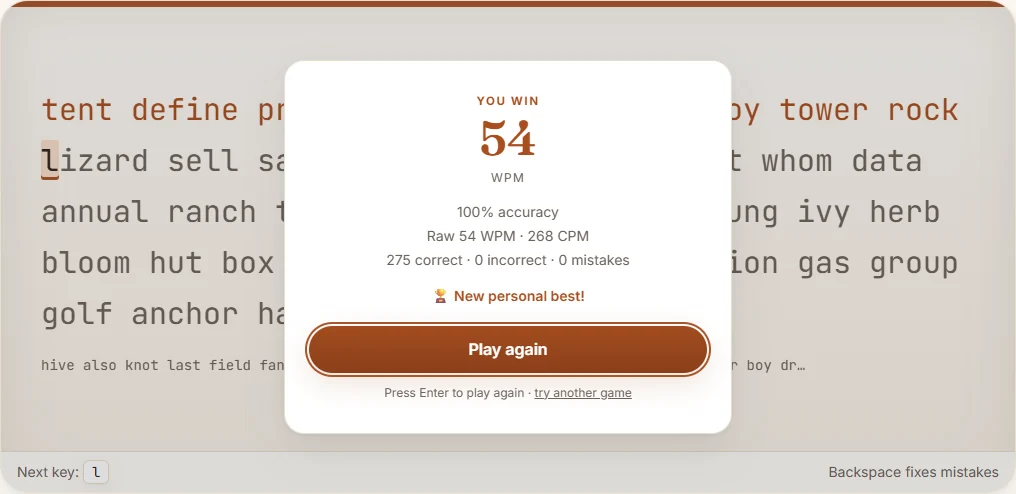
Understanding this specific formula is highly important. You might assume that you can find your net WPM just by taking your raw WPM and multiplying it by your accuracy percentage. That is mathematically incorrect on this platform. Net WPM cannot be found from raw WPM multiplied by attempt accuracy, because accuracy measures total attempts, while net speed measures the final retained matched characters.
Figuring out your accuracy percentage
Accuracy is the third major metric you need to understand. While raw and net speeds measure your output over time, accuracy measures your physical precision on the keyboard. It tells you how often your fingers hit the exact key you intended to hit.
The ProTypingGames accuracy formula uses all of your keystroke attempts. An attempt is any scored input you make during the test. A successful attempt is when you strike the correct key called for by the prompt. If you press the wrong key, that is an unsuccessful attempt.
The crucial detail here is how corrections are handled. Fixing a typo does not erase the initial failed attempt. If you type the wrong letter, hit backspace, and then type the right letter, your total attempts increase. The platform remembers that you made a mistake.
Accuracy = (Successful attempts / All scored attempts) * 100
This formula gives you a percentage that reflects your overall precision. If you are constantly making mistakes and backspacing to fix them, your accuracy percentage will drop, even if your final retained text is perfectly correct. A large-scale analysis of 136 million keystrokes by researchers at Aalto University suggests that everyday typing behavior involves a significant amount of backspacing and error correction. If you find yourself hitting the backspace key frequently, you are experiencing a very normal part of the typing process, but it will reflect in your total attempt math.
Worked example 3: Calculating precision Let us look at a short, specific typing scenario to see how attempts are counted.
- You take a test and make a total of 400 scored attempts.
- Out of those 400 key presses, you hit the correct key 372 times.
- Step 1: Divide successful attempts by all scored attempts. (372 / 400 = 0.93)
- Step 2: Multiply by 100 to get the percentage. (0.93 * 100 = 93)
- Result: Your accuracy is exactly 93 percent.
Because the system rounds the final number, an accuracy calculation that results in 96.8 percent will display accordingly. Tracking your accuracy over time helps you see if you are rushing. If your net speed is stagnant but your raw speed is high, checking your attempt ratio will usually reveal that you are wasting time pressing incorrect keys and fixing them.
Putting the math to work
Now that you know exactly how the formulas operate, you can apply this knowledge to your own practice sessions. You do not have to perform these calculations by hand every time you type, as the platform does the heavy lifting for you. However, knowing the mechanics allows you to design better practice routines.
Start by taking a standard 1-minute typing test to establish your current baseline. Focus purely on hitting the correct keys rather than rushing the clock. Because the test starts on your first accepted input, you can take a deep breath and position your hands on the home row before you begin. At the end of the sixty seconds, review your raw WPM, your net WPM, and your accuracy. Look closely at the gap between your raw and net scores. A large gap means you are leaving too many unmatched characters in your retained text.
Next, try a longer format. The paragraph typing test uses separate, structured content rather than a continuous word stream. This forces you to handle standard sentence structures, capitalization, and natural spacing. Because you are typing for a longer duration, fatigue can set in, which often leads to an increase in failed attempts. Watch how your accuracy percentage shifts when you have to maintain focus over multiple paragraphs.
If you are wondering how your calculated scores stack up, you can review what constitutes a good typing speed to set your next goal. Remember that progress requires balancing your raw volume with your precision. You cannot improve your net WPM if you are constantly generating unsuccessful attempts.
Take control of your typing habits by doing a manual speed calculation today. Open a test, type carefully for exactly two minutes, write down your total retained characters and correctly matched characters from the results screen, and do the division yourself to see your exact true speed.
Put it into practice
The fastest way to improve is to play. Jump into a free typing game and try it now.
Play free typing games